
How to save a recipe from Pinterest (without the life story)
Pinterest is great for finding recipes and terrible for cooking from them: a pin is a picture that sends you to a blog full of ads and a long story before the ingredient list. Here’s how to turn any recipe pin into a clean, written recipe in a few taps.
Updated November 2, 2026
The fast way: share it to Buttter
Buttter is a recipe manager for iPhone and iPad. It works from the iOS share sheet, so you never have to leave the app you found the recipe in.
- Open the pin. Find the recipe pin in the Pinterest app and tap the Share icon.
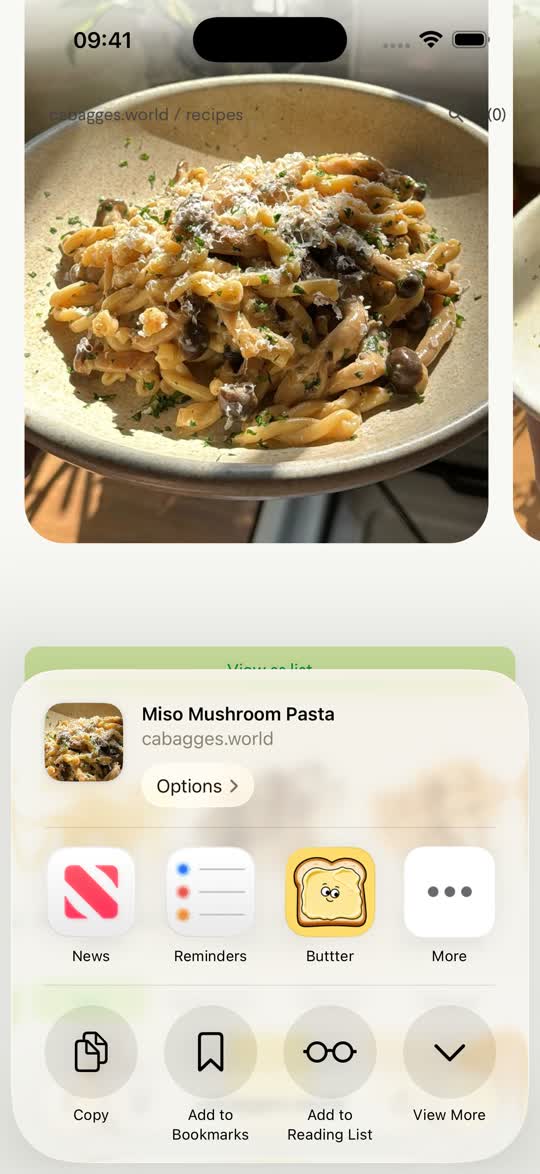
- Open the iOS share sheet. In Pinterest’s share panel, tap More to open the standard iOS share sheet, or tap Copy link.
- Pick Buttter. Choose Buttter from the app row (it may be under More the first time). If you copied the link, open Buttter and paste it on the Import screen.
- Check and cook. Buttter writes out the ingredient list with amounts and numbered steps, adds nutrition, and files the recipe into a cookbook. Give it a quick read, adjust anything you like, and start cooking.
Every kind of recipe pin works
Pins come in a few shapes. Whatever you share, you get the actual recipe:
- Pins that link to a recipe website. You get the recipe itself: ingredients, amounts, steps and the photo, with the ads, pop-ups and life story left behind.
- Video pins. Even when nothing is written down, you get a full written recipe.
- Recipe card pins. An image of a recipe card or infographic becomes a recipe you can edit and scale, with the card kept as the cover photo.
If a pin is just a pretty photo with no recipe behind it, Buttter tells you so instead of inventing one.
Pinterest boards vs a recipe app, compared honestly
- Pinterest boards. Perfect for collecting ideas and browsing. But a board stores links, not recipes: if the blog moves or shuts down, the pin goes dead, and you can’t search your boards by ingredient.
- Printing the blog post. You keep the recipe, plus six pages of ads and story. Many blogs have a print button that helps; many don’t.
- Screenshots. Quick, but they don’t scale servings and they get buried in your camera roll.
Keep using Pinterest to discover. Save the ones you actually want to cook to Buttter.
After you’ve saved it
- Scale it. Change the servings and every quantity recalculates. Try the free recipe scaler to see how it works.
- Shop for it. Send the ingredients in one tap to Apple Reminders, Things 3 or Todoist.
- Cook from it. Step-by-step cook mode keeps the screen awake while your hands are messy.
- Organize it. Buttter can file each import into the right cookbook automatically, a bit like boards, but searchable by name or ingredient.
The same flow works for Instagram, TikTok, YouTube, Facebook and any recipe website.
Questions, answered
How do I save a recipe from Pinterest?
Tap the Share icon on the pin, then More or Copy link, and pick Buttter or paste the link into Buttter’s Import screen. You get the actual recipe with ingredients and steps, not just the pin.
Does it work with Pinterest video pins?
Yes. Video pins become a full written recipe, even when nothing is written down.
What about pins that are just an image of a recipe card?
It becomes an editable recipe, with the card kept as the cover photo.
Can I import a whole Pinterest board?
Not in one go. Share each pin you want to cook to Buttter; it takes a few seconds per recipe.
Can I use it on a computer?
Buttter is an iPhone and iPad app (iOS 18 or later). There is no Android, Mac or web version, so save pins from your phone or iPad.
Is it free?
Buttter is free to download. Some AI features are part of an optional subscription, and the price is shown in the app before you subscribe.
