
How to save recipes from Instagram
Instagram’s bookmark keeps the post, not the recipe. Here’s how to turn a Reel or a carousel into a written recipe you can search, scale and shop for.
Updated October 18, 2026
Save a Reel or post as a real recipe
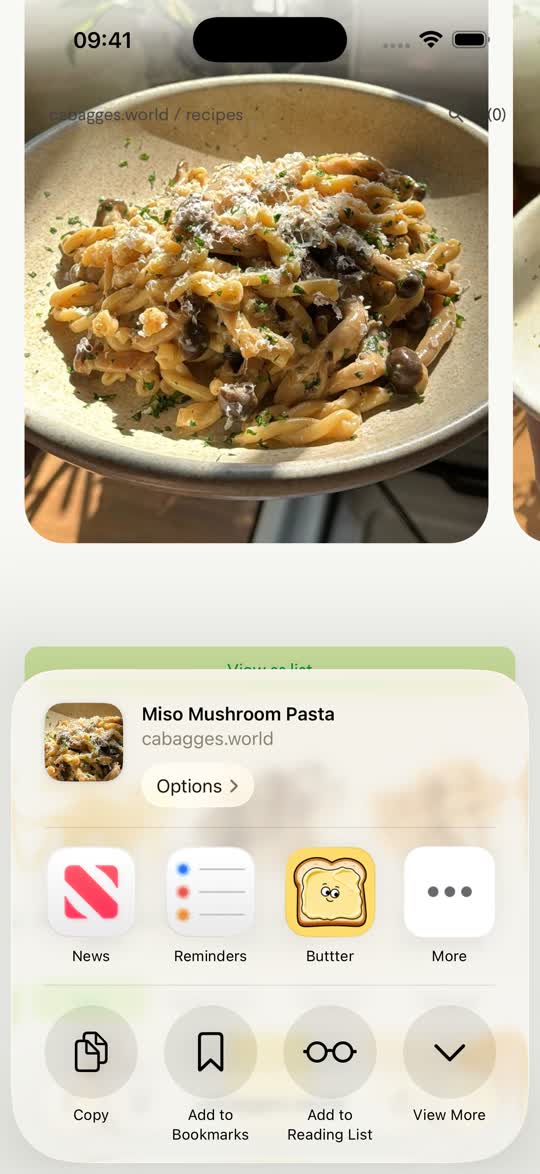
Buttter is an iPhone and iPad recipe manager that plugs into the iOS share sheet, so saving from Instagram takes a few seconds.
- Open the post. Find the Reel or recipe post in Instagram and tap the paper-plane share icon.
- Share or copy the link. Choose Share to… (or More) to open the iOS share sheet, or tap Copy link.
- Pick Buttter. Choose Buttter from the share sheet, or open Buttter and paste the link on the Import screen.
- Review and save. You get a clean recipe card with ingredients, amounts, steps and nutrition, filed into a cookbook. Tweak anything you want.
Reels, carousels and single photos
- Reels. Buttter reads the caption and looks at key moments of the video itself, so a Reel with “recipe below 👇” and nothing below still becomes a recipe. Ingredients that are shown or written on screen come through best; amounts that are only spoken may be estimated.
- Carousel posts. Many creators put the recipe on the slides. Buttter reads every slide, not just the first one.
- Single photo posts. The caption and the photo are combined into one recipe.
When the recipe is “in the comments” or “link in bio”
Some creators keep the full recipe on their blog. Buttter works from the post you share, so if the caption points somewhere else, open the creator’s link and share that page to Buttter instead. Any recipe website works, and you get the creator’s exact quantities, without the ads and life story.
Why not just use Instagram’s Save button?
Instagram’s Save and Collections are great for inspiration. As a recipe box they have limits:
- A saved post is a bookmark to someone else’s post, so it is only there as long as that post is.
- You can’t search your saves by ingredient, scale servings or check off steps.
- Getting the ingredients onto a shopping list means retyping them.
Saving to Buttter gives you your own copy of the recipe, with ingredients you can send in one tap to Apple Reminders, Things 3 or Todoist.
If an import doesn’t look right
- Buttter isn’t in the share sheet. Scroll the app row to the end, tap More, and turn Buttter on. Or copy the link and paste it on the Import screen; it does exactly the same thing.
- Amounts look off. When a creator only says quantities out loud, Buttter estimates them from what it can see. Edit the recipe; your changes stick.
- The post won’t import. Make sure the account is public and the post hasn’t been deleted or archived. If the recipe lives on a website, share that page instead.
- Wrong units. Set metric or imperial once in Settings and new imports arrive in your units.
Organize what you save
Buttter can file each import into the right cookbook automatically, and you can keep your own personal cookbooks alongside curated and community collections. Everything is searchable by name or ingredient. Saving from TikTok? Use the same flow for TikTok. Out of ideas entirely? Try the fridge photo recipe generator.
Questions, answered
How do I save a recipe from an Instagram Reel?
Tap the share icon on the Reel, choose Share to… or copy the link, then pick Buttter or paste the link into Buttter’s Import screen. Buttter writes out the ingredients and steps.
Does it work with carousel posts?
Yes. Buttter reads every slide of a carousel, which is where many creators put the actual recipe.
Can I save from a private Instagram account?
No. Buttter can only read posts that anyone with the link can open.
What if the recipe is on the creator’s blog?
Open the link from their bio or caption and share that web page to Buttter. Any recipe website can be imported.
Do I need an Instagram login in Buttter?
No. You only share a link. Buttter signs you in with Apple and never asks for your Instagram account.
