
Snap your fridge, get a recipe
Half a pepper, some eggs, a lonely block of feta. Point your camera at the fridge and Buttter turns what’s actually there into dinner.
Updated October 18, 2026
How it works
- Snap your fridge or pantry. Open Generate in Buttter and take a photo of your fridge shelves, pantry or the pile on the counter. Add more photos if you like.
- Check the ingredient list. Buttter lists the ingredients it can see. Remove anything wrong and add what it missed by typing or by voice.
- Set your preferences. Pick any diets (vegetarian, vegan, keto, gluten-free, halal, kosher and more), allergies to avoid, and what you’re craving.
- Get your recipe. Buttter writes a full recipe around what you have, with amounts, steps and nutrition. Not feeling it? Generate another.
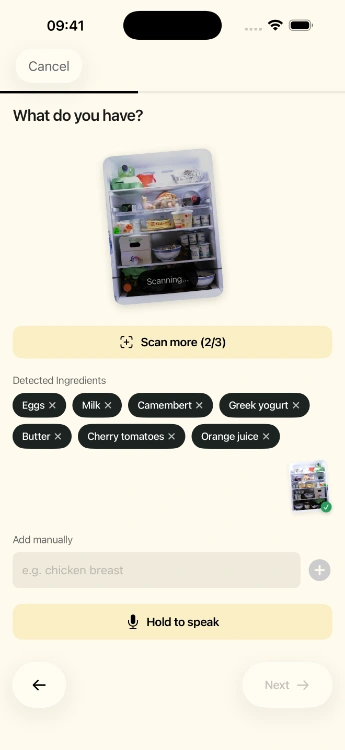
From photo to ingredient list
The photo isn’t a gimmick for the recipe itself: its job is to save you typing a shopping inventory. Buttter identifies the ingredients it can see and gives you an editable list. That list is what the recipe is built from, so you stay in control. Spot an item it got wrong? Delete it. Have a few things in a cupboard you didn’t photograph? Type them, or just say them.
Prefer not to take a photo at all? You can build the list entirely by typing or by voice. It works the same way.
Matched to how you eat
Recipes respect the preferences you choose: diets such as vegetarian, vegan, pescatarian, keto, gluten-free, dairy-free, halal and kosher; allergies and things to avoid, such as gluten, lactose, peanuts, tree nuts, fish, shellfish and alcohol; and cravings, from pasta to salad. Every generated recipe comes in your preferred units (metric or imperial) and shows calories, protein, carbs and a full nutrition breakdown.
Getting good results
- Light matters. Open the fridge door wide or take the photo with the kitchen light on. Dark shelves hide things.
- Containers are a mystery. Opaque tubs and jars can’t be identified from outside, so add their contents by hand.
- Labels help. Packaged food with a visible label is easier to recognize than the back of a carton.
- Staples are assumed carefully. Add salt, oil and spices to the list if you want the recipe to rely on them.
Missing one or two things?
Buttter doesn’t keep a second shopping list for you to maintain. Send the recipe’s ingredients in one tap to the list you already use, Apple Reminders, Things 3 or Todoist, and tick off what you have.
Want a starting point instead? The free 5 Ingredients or Less and Budget-Friendly Meals cookbooks are built around short, cheap ingredient lists.
Keep the good ones
Generated recipes save into your library next to everything you’ve imported, from TikTok, Instagram, Facebook, Pinterest or any website, all searchable by name or ingredient.
Questions, answered
What can I make with the ingredients I have?
Take a photo of your fridge or pantry in Buttter, or type what you have, and it writes a complete recipe around those ingredients, matched to your diet and allergies.
How accurate is the fridge photo scan?
It recognizes most visible fresh and packaged food. Items in opaque containers or dark corners can be missed, so the ingredient list is always editable before you generate.
Can I type ingredients instead of taking a photo?
Yes. You can type or say your ingredients, or combine that with photos.
Does it handle allergies and diets?
Yes. Choose diets such as vegan, keto or gluten-free and allergens to avoid, and the recipe is built around them. Always double-check labels if an allergy is serious.
Is the fridge photo feature free?
Buttter is free to download and includes a limited number of free photo scans. Unlimited use is part of the optional subscription; the price is shown in the app before you subscribe.
