
How to save a recipe from TikTok (even with no caption)
TikTok is where half of the internet’s dinner ideas live now, and almost none of them come with a written recipe. Here’s how to turn a TikTok into a real recipe you can shop for, scale and cook from, in about three taps.
Updated October 18, 2026
The fast way: share it to Buttter
Buttter is a recipe manager for iPhone and iPad that reads a TikTok for you. It works from the iOS share sheet, so you never leave TikTok to save something.
- Open the TikTok. Find the recipe video (or photo slideshow) in the TikTok app and tap the Share arrow on the right.
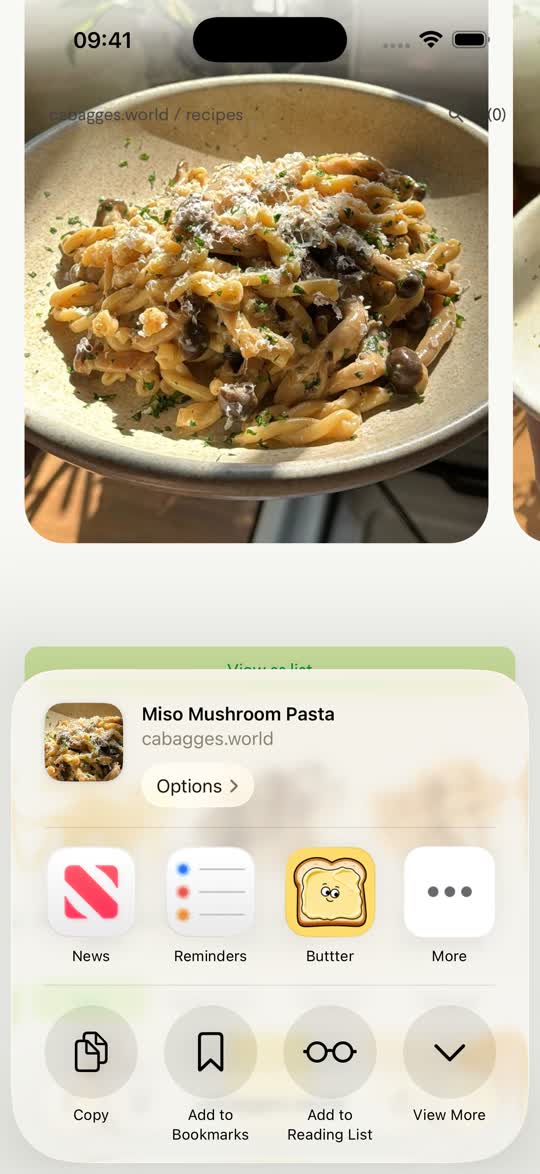
- Open the iOS share sheet. In TikTok’s share panel, swipe to More to open the standard iOS share sheet. If you prefer, tap Copy link instead.
- Pick Buttter. Choose Buttter from the app row (it may be under More the first time). If you copied the link, open Buttter and paste it on the Import screen.
- Check and cook. Buttter writes out the ingredient list with amounts and numbered steps, adds nutrition, and files the recipe into a cookbook. Give it a quick read, adjust anything you like, and start cooking.
What if the recipe is only in the video?
This is the case most “recipe saver” tools give up on: no caption, or a caption that just says “so good 😭”. Buttter doesn’t stop at the caption. It looks at key moments of the video itself, the ingredients going into the pan, the text overlays, the finished dish, and combines that with whatever text the post has to write out a complete ingredient list and method.
It works best when ingredients are visible or written on screen. Exact amounts a creator only says out loud and never shows may come back as sensible estimates, so it’s worth a glance at quantities before you cook. TikTok photo slideshows work too: Buttter reads each slide.
Other ways to keep a TikTok recipe, compared honestly
- TikTok Favorites. Tapping the bookmark saves the video inside TikTok. It’s free and instant, but it saves a video, not a recipe: no ingredient list, no searching by ingredient, and you’ll be pausing and rewinding at the stove.
- Screen recording or screenshots. You keep a copy, but it ends up buried in your camera roll with every other screenshot, and you still have to work out the amounts yourself.
- Copying the caption into Notes. Fine when the creator wrote the full recipe in the caption. Most don’t, and Notes won’t scale servings or send ingredients to your shopping list.
If you only save a recipe now and then, Favorites is perfectly fine. If you actually cook from TikTok every week, a written recipe saves real time.
After you’ve saved it
- Scale it. Change the servings and every quantity recalculates.
- Shop for it. Send the ingredients in one tap to Apple Reminders, Things 3 or Todoist, whichever list you already use.
- Cook from it. Step-by-step cook mode keeps the screen awake while your hands are messy.
- Find it again. Search across everything you’ve saved by name or ingredient, and Buttter can sort new imports into cookbooks automatically.
The same flow works for Instagram Reels and posts and YouTube videos and Shorts, Facebook and Pinterest, and for any recipe website.
Questions, answered
Can Buttter save a TikTok recipe that has no caption?
Yes. Buttter looks at key frames of the video together with any text on the post and writes out ingredients and steps. Amounts that are only spoken and never shown may be estimated, so check them before cooking.
Does it work with TikTok photo slideshows?
Yes. Photo posts (slideshows) are read slide by slide.
Can I save a recipe from a private TikTok account?
No. Buttter can only read posts that anyone with the link can open. Private and friends-only videos can’t be imported.
Can I use it on a computer?
Buttter is an iPhone and iPad app (iOS 18 or later). There is no Android, Mac or web version, so save TikToks from your phone or iPad.
Is it free?
Buttter is free to download. Some AI features are part of an optional subscription, and the price is shown in the app before you subscribe.
